
Daman Game Recharge: wallet entry, amount input and record checks.
The Daman Game Recharge interface places wallet information, payment-channel choices and an amount field in separate sections. Those are sensitive controls because a wrong amount, an impersonated payment screen or a mismatched account can expose personal and financial information.
This page explains how to recognise the parts of the recharge screen and how to review account records. It does not process payments, recommend depositing funds or verify that any third-party recharge channel is lawful or safe.
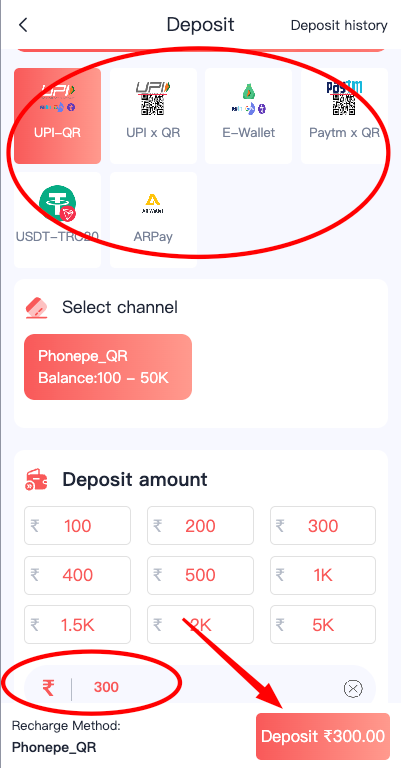
What the recharge screen contains
The mobile reference shows a recharge area with selectable channels near the top and an amount-entry region below. The screen can also display suggested amounts. Those values are interface choices, not evidence that a transfer is required or appropriate. Always distinguish a suggested figure from the amount you intended to enter.
An account dashboard may show Deposit and Withdraw shortcuts side by side. They serve different purposes. Deposit relates to money entering a wallet, while Withdraw relates to requests to move money out. Selecting the wrong one is a common source of confusion, especially when the icons are close together.
The account area also includes transaction and deposit-history links. Records matter because a screen that simply says “success” is not enough to resolve every dispute. A dated history entry, order reference and independently verifiable transaction information are more useful than an isolated promotional claim.
Protecting financial information
Be alert if a payment screen asks for a transfer to a personal account, requests a code through a message, or changes payment instructions unexpectedly. Never share a banking PIN, card security code or OTP with someone claiming to be account support.
Payment interfaces and screenshots can be copied by impostors. The brand name on a coloured screen is not proof of identity. Cross-check the address and destination independently, and do not use a payment request that appears through an unverified redirect or unsolicited message.
Online money gaming transactions in India are subject to central prohibitions. A screenshot showing a recharge option does not establish that the service or payment is permitted. This independent page provides safety information, not instructions to carry out a deposit.
See the relevant Daman Game screens.
Recharge amount view
Payment-channel options, amount controls and related labels.
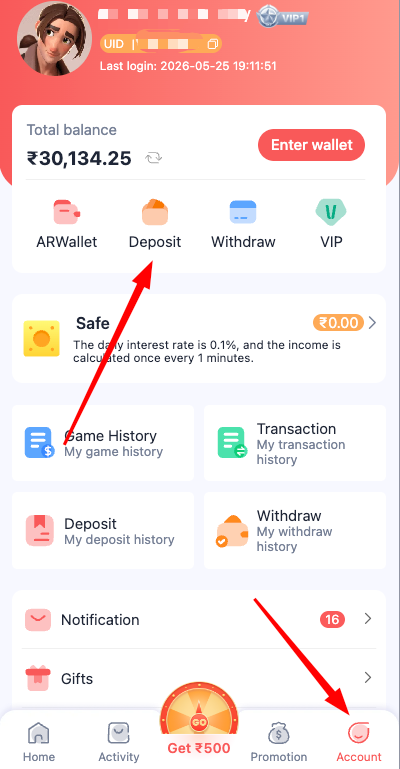
Account wallet shortcuts
Deposit, Withdraw and other account shortcuts.
Finding the right record
If a user needs to understand a past transaction, the deposit-history area is more relevant than a general game-results page. A record might show a date, amount, reference and status. These fields should be read together rather than drawing a conclusion from one line.
Withdrawal history is a different section and has its own considerations. The Daman Game Withdraw page explains the payout and history screens. For information on account access before examining records, use the Daman Game Login page.
Reading a wallet screen without confusing it with a payment request
The Daman Game Recharge screenshot contains several visually separate areas: a choice of deposit or payment channel, an amount selection, and controls related to the account wallet. A visitor may see preset figures or highlighted tabs, but those are interface elements, not advice about what amount to use. The first question should be whether the screen belongs to the expected account and whether its source can be verified. A convincing colour scheme or familiar logo is not enough to establish trust.
Wallet figures are especially sensitive because someone may mistake a displayed balance, an example amount and a confirmed transaction for the same thing. A balance is a snapshot of what the account reports. An amount-entry field is a proposed action. A record or transaction identifier is evidence that some event was logged, but it does not independently prove that money reached its intended recipient. Keeping these terms separate is essential when reading old screenshots.
This informational page does not process payments or recommend transfers. India has restrictions on online money-game services and payments connected with them. If a screen invites a transaction that may be prohibited, a responsible next step is to stop rather than assume that a familiar brand name makes the payment permissible. The screenshot is used here to explain the visible parts of the interface and the kinds of records a person may need to understand.
What transaction records can and cannot prove
An activity log can be helpful if an account shows a change that the user cannot explain. Look for a reference number, timestamp, amount and status in any available record. These fields help distinguish a pending item from one that is marked completed, cancelled or failed. The status text should be read exactly as displayed; do not interpret an unchanged balance as proof that a transaction is still processing. A separate record may carry more context than the main dashboard.
A bank or payment-provider statement and an in-app wallet record are not interchangeable. One describes activity in the external financial account, while the other describes what a particular service reports internally. If a user is trying to understand a discrepancy, it is reasonable to preserve both records without uploading passwords, full card numbers or identification documents to unknown support channels. Screenshots shared publicly should have personal details removed.
The video and screenshots are time-specific. Channel names, minimum amounts, available methods and processing rules may have changed since they were captured. Do not turn a past example into a present-day guarantee. A page that says deposits are instant or that a particular method always works would overstate what the material establishes. We therefore describe the visible design and the meaning of common status labels without certifying any payment option.
Spotting risky instructions and impersonation attempts
Payment-themed scams often arrive through copied screenshots, fake customer-service profiles or messages that say an urgent manual transfer is needed. Someone may claim that a stalled recharge can be fixed by paying a second amount to a different account. Another common red flag is a request to share an OTP or install remote-access software. Those actions should not be accepted merely because the message uses the same colours or logo as the Daman Game interface.
Check whether a supposed support instruction originates from a verifiable service channel, not from a forwarded message. Never disclose a banking password, PIN or one-time code. If a payment has already been made and its status is uncertain, preserving relevant records and contacting the financial institution through its established channels is safer than following a stranger's link. Repeatedly sending money to 'unlock' an earlier transaction creates additional risk.
Related links to Withdrawal and Account Security provide context for those separate concerns. It should not blur them into one long set of steps. Recharge concerns an incoming wallet transaction, withdrawal concerns an outgoing request, and security covers access to the account itself. Understanding these boundaries is more useful than reading generic claims about fast processing or guaranteed credit.
Daman Game Recharge FAQs
Does this website process Daman Game Recharge payments?
No. It is an independent information website and does not collect or transfer money.
What is the difference between Deposit and Withdraw icons?
Deposit usually refers to funds entering a wallet, while Withdraw refers to funds leaving it.
Why might a recharge screenshot be misleading?
Screens and payment instructions can be copied or become outdated. They do not verify the identity or legality of a payment destination.
What information helps when reviewing a past transaction?
A dated record, amount, reference identifier and status are more useful together than a single success message.